Bold Gold Type
This this week's article is going to focus on what I
consider a fun effect... creating solid gold type embedded
in metal. Wait until you see the result... these letters
look heavy!
Let's start out by creating a new
image. I'm setting mine up as follows:
Width: 8 in
Height: 4 in
Resolution: 150
Mode: RGB
Background: White
Since we are basically doubling the 72 dpi,
you can view this at 50% and still have a fair rendering of
what the full-blown image looks like.
Now that we have our foundation, set the
foreground color to Black and the background to a light
orange... almost yellow. For this example my background is
set to #FF9900.
Type in your text in a new layer and
Rasterize the type. Command/Control>Click the layer name to
turn your type into a selection. Add Noise at about 30%
Gaussian, and apply difference clouds 3 times. Here's my
example:

Before we get too gung-ho, duplicate this
layer and let's work on a copy.
Apply the Photocopy filter (Filter>Sketch>Photocopy) and set
the detail to 7 and darkness to 8. Apply the Plaster Filter
(Filter>Sketch>Plaster), adjusting the Image Balance to
taste. My settings are shown below:
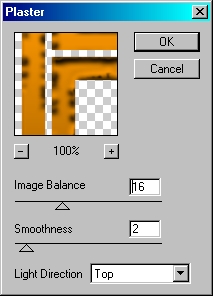
Once satisfied, click OK.
Go to Filter>Render>Lighting Effects. I'm
just using the default settings, but you can certainly
change the brightness as you see fit.
It's starting to shape up nicely, isn't it?
I'm not done yet though. The one problem I have is the depth
issue... as it stands it appears someone poured our gold on
a piece of plain white paper, and that just won't do. We
want these letters to jump off the page, not lay there like
a dead trout destined for the frying pan... Oops, guess my
mind was wandering again. Did someone say 'Trout'?
Let's go back to the original type layer. Go
to Layer Styles, and apply the following Stroke:
Size: 10
Position: Outside:
Blend Mode: Normal
Opacity: 100%
Fill Type: Gradient
Gradient: Black to White
Style: Shape Burst
Create a new layer beneath this one,
reselect this layer and merge down. Now go back to layer
styles and apply this bevel:
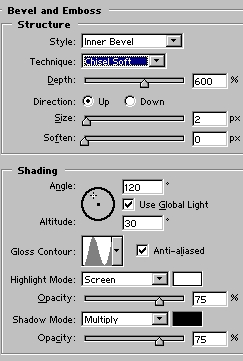
...and this Bevel Contour:
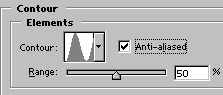
You should have something resembling this:

We're getting there now. I still want a bit
more depth; so create a new layer beneath this one. Select
this layer and merge down (Command/Control+E), then
duplicate the layer.
No select the bottom most type layer, click
the selection tool, and with the arrow keys move the type
Left+2 clicks and Up+1 click. Duplicate again, select the
bottom most type layer, and move it again. Repeat this
process until you are happy with the thickness of the
lettering.

The edges look pretty dull, so let's spice
them up a bit. We are working with metal after all, and we
want this puppy to shine!
Starting with the first layer we moved,
begin merging down until you have 3 layers and the
background layer. To the bottom type layer... this should be
the one with all the merged layers... apply the bevel/emboss
in the Layer Styles with these settings:
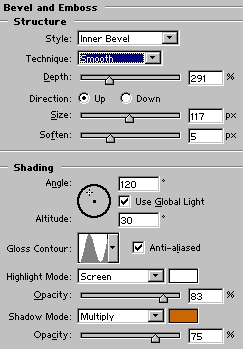
Now just dress it up with some sparkles
using the paintbrush or what ever. You may also want to
place a shadow behind it to really dress it up. Here's my
finished product:

Hope you enjoyed this little ditty! As for
me, I'm outta here, as there's a trout out there with my
name on it. See ya at www.actionfx.com !
|




 advertisment

 advertisement

 Host With Us: HostingHelper.co.uk From Only $5.00p/m