Tutorials & Script Homepage
Photoshop 22to28
Perspective Text
Warping More Than Just Text
Inset Text
Bold Gold Type
Custom Textures, Kiler Type
Making Text Look Sharper
Pill Shaped Button Graphics
advertisment
advertisement
advertisement
Host With Us: HostingHelper.co.uk From Only $5.00p/m
Spotted an Error ? Let us Know
100's more FREE templates at FreeWebTemplates
Looking for a new Web Host ?
Free templates from TemplatesLand
Professional High-End Templates
TemplateBox.com more FREE templates
Free Flash Templates and Intros
advertisment
advertisement
 
PHOTOSHOP TUTORIAL NUMBER : 22
Please Click Here, and Help Keep This Site FREE to Use
 
Please click on our sponsors advert to the right if you download or use anything from this page.
Thank you for your help.
This tutorial has been created by: Josh Spivey at Planetphotoshop.com

Perspective Text

Let's say you want to create some text that looks as though it is disappearing off into the distance. If you notice, you cannot transform text with perspective transform function. If you rasterize the type before you transform it, the text will look blurry. This seems like a real problem that keeps you from creating this effect. However, there is a way to do this, and we will look at it this week.

First let's create some text. I used Impact.



The we want to turn this text into a shape. This will allow us to transform its shape in any way we want. We can skew it and give it perspective. To do this go Layer -> Type -> Convert to Shape. After this is done, we will no longer have the ability to edit the text. So make sure you have your text the way you want it before you do this.
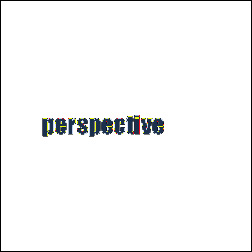


Above is what your canvas will look like when you have converted the text into a shape.

Next we are going to transform it. Go Edit -> Transform -> Perspective. Grab either the top or the bottom left corners of the transformation box. Pull the handle on the corner up or down depending on which corner you chose. This will apply a perspective transformation to the text shape.
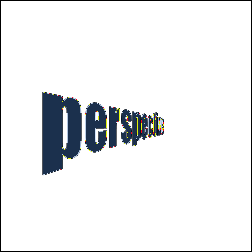


Now that this is done, we will need to rasterize the shape in order to remove the shape path. Go Layer -> Rasterize -> Shape. This will create a truly rasterized image.



Notice how clean and crisp the text is after doing this. If we were to rasterize the type before we transformed it, we would end up with a fuzzy edge. By first transforming our text into a vector shape, we prevent this from happening.

This is a great little trick that you will probably find use for at some point. I have used it several times in the past. It only takes a second to do, but it makes a much better final product if you transform the shape first rather that rasterizing and then transforming.

Web Hosting  |  Membership website templates  |  Dallas Web Design  |  Text Link Adds  |  Art Web Templates  |  Cheap Flight Deals  |  Domain Name Hosting  |  Digital Camera  |  Coursework Writing  |   Youth hostels  |  Internet Marketing  |  Web Design  |  Low Cost Domain Names  |  Burial Life Insurance  |  Website templates  |  Broadband Reseller  |  Dedicated Server  |  Business Broadband  |  Professionelt webdesign firma - webbureau  |  ATX Web Design - Texas TX  |  Flash Templates  |   tablet notebook  |  Machinery moving Los Angeles  |  Flash Intros  |  Web Templates  |  epi suite software  |  Cheap Web Hosting  |  web hosting  |  Website Templates  |  Corporate Logo Design Service  |  ID card printers  |  id cards  |   Free Web Hosting  |  UK Web Hosting  |  Dating Software - aeDating 4.1  |  Flash Templates  |  Website Templates  |  Power Saver  |  Website Design Quote  |  Flash templates  |  cctv cameras  |  Web Design Manchester  |  Web Templates  |   Flash templates  |  Cheap Web Hosting Deal  |  Linux Hosting  |  Web Design uk  |  Web Hosting  |  Business web directory  |  Accept Credit Cards  |  Mobile Phone Contracts  |  Car Rental Deals  |  Free domain names  |  Business Email  |  Web Designer Delhi  |  video surveillance systems  |  

 
advertisment
advertisment
advertisment
advertisment
  Top-end templates
  Credit Cards
  Reseller web hosting UK
  free flash tutorials
  Web Hosting
  Hosting Directory
  Corporate Gifts
  Company Logos
  Christian Designs
  Website Templates
  Website Templates
  Web Hosting UK
  Free Web Templates
  Custom site design
  Domain Names
  Logo Design Pro UK
  Free Flash
  templatebox.com
  freewebtemplates.com
  templatesland.com
  topfreegraphics.com
  freegraphicland.com
  free-templates-layouts
  Ink & Toner Cartridges
  Layouts4Free
  Webmaster Resoucres
  Web Templates Factory
  Free Web Templates
  Free Templates Catalog
  Web Templates
  Reseller Web Hosting
  Stock Photography
  Animations-galore.com
  4print.com.au
  Host Review
  Web Hosting Host Color
  Dedicated Servers
  FlashTemplateDesign
  ZeroDollarTemplates
  Killersites.com
  how-to-build-websites
  Build a free website
  web Hosting
  Business Logo Design
  Templates Favpage
  webmastermind.de
  flasheasy.com
  More Featured Sites