Tutorials & Script Homepage
Photoshop 15to21
Pixellated Blur
Burnt Wood in Photoshop
Fun With Effects
Quick and Easy 3D
Bevel Tricks
Fun With Gradients
Pixel Fonts
advertisment
advertisement
advertisement
Host With Us: HostingHelper.co.uk From Only $5.00p/m
Spotted an Error ? Let us Know
100's more FREE templates at FreeWebTemplates
Looking for a new Web Host ?
Free templates from TemplatesLand
Professional High-End Templates
TemplateBox.com more FREE templates
Free Flash Templates and Intros
advertisment
advertisement
 
PHOTOSHOP TUTORIAL NUMBER : 19
Please Click Here, and Help Keep This Site FREE to Use
 
Please click on our sponsors advert to the right if you download or use anything from this page.
Thank you for your help.
This tutorial has been created by: Al Ward at http://actionfx.com

Bevel Tricks

There is a technique concerning the lighting and shading of the bevel in that tutorial that has opened new doors for me, and I thought I would share it with you. And what better way to share it than to show you! Here's a demonstration.

To start, I have a 2 layer image (white background, 50% gray text).



I hope that you are becoming familiar with Layer Styles in Photoshop 6, as we will use these to turn our type into some form of plastic or glass. I'm going into this with little idea what the end result will be… it makes the process a bit more interesting that way!

On the type layer, I'm going to apply a bevel. As I am going for a glassy effect I want a soft bevel. With this in mind, my initial settings are:

Style: Inner Bevel
Technique: Smooth
Depth: 250%
Direction: Up
Size: 12
Soften: 5

All other settings are at default. Here's the image now:



Now that the shape of the type is established, it is time to work on the shading. This is where things start coming together.

The trick here concerns the 'Shadow Mode'. You will see the Photoshop default setting is 75% black, mode set to multiply. Also the highlight mode is set to 75% white. Let's bump that up to 100%. Change the Shadow mode color to something very light, though not white. My color number for this example is #FFE5BC. Also, I'm changing the mode from multiply to screen. I've changed the opacity to 88. Here's the result:



Sorta needs something, doesn't it? Let's add some color. I'm adding a Color Overlay with #FF7200 set to 75%.

Now I'm duplicating the type layer and setting it to overlay. I'm continuing to work on the original layer, however.

If you have been viewing the styles that shipped with Photoshop, you may have noticed that right now your type resembles the effect in the 'Glass Rollover' styles pack. Those styles are another excellent resource for learning shading, and I strongly urge you to get into the settings those effects apply. They will teach you much, Young Grasshopper.

As I continue, I'm applying a Gradient Overlay to our original text layer with the following settings:
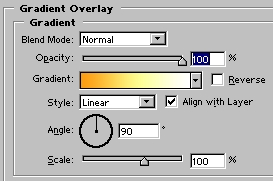


I am also applying a Stroke using a gradient. Here is the image:



Remember the duplicated layer? Create a layer beneath that one and reselect the duplicated layer. Merge down, change the mode to overlay. On the original type layer I've moved the bevel slider to 16.



So is the image transparent? Try dropping an image below the top layer, and set the image to overlay as well. Here's mine:



Web Hosting  |  Membership website templates  |  Dallas Web Design  |  Art Web Templates  |  Cheap Flight Deals  |  Domain Name Hosting  |  Digital Camera  |  Coursework Writing  |  Reseller Hosting  |   Youth hostels  |  Web Design  |  Low Cost Domain Names  |  Burial Life Insurance  |  Website templates  |  Broadband Reseller  |  Dedicated Server  |  Business Broadband  |  Professionelt webdesign firma - webbureau  |  ATX Web Design - Texas TX  |  Flash Templates  |   tablet notebook  |  Flash Intros  |  Web Templates  |  Cheap Web Hosting  |  web hosting  |  Website Templates  |  Corporate Logo Design Service  |  UK Web Hosting  |  Website Hosting  |  Machinery moving Los Angeles  |   Free Web Hosting  |  UK Web Hosting  |  Dating Software - aeDating 4.1  |  Flash Templates  |  Website Templates  |  Power Saver  |  Website Design Quote  |  Flash templates  |  cctv cameras  |  website builder  |  Web Templates  |   Flash templates  |  Cheap Web Hosting Deal  |  Linux Hosting  |  Web Design uk  |  Web Hosting  |  Business web directory  |  Accept Credit Cards  |  Mobile Phone Contracts  |  Car Rental Deals  |  Free domain names  |  Business Email  |  Web Designer Delhi  |  

 
advertisment
advertisment
advertisment
advertisment
  Top-end templates
  Credit Cards
  Reseller web hosting UK
  free flash tutorials
  Web Hosting
  Hosting Directory
  Corporate Gifts
  Company Logos
  Christian Designs
  Website Templates
  Website Templates
  Web Hosting UK
  Free Web Templates
  Custom site design
  Domain Names
  Logo Design Pro UK
  Free Flash
  templatebox.com
  freewebtemplates.com
  templatesland.com
  topfreegraphics.com
  freegraphicland.com
  free-templates-layouts
  Ink & Toner Cartridges
  Layouts4Free
  Webmaster Resoucres
  Web Templates Factory
  Free Web Templates
  Free Templates Catalog
  Web Templates
  Reseller Web Hosting
  Stock Photography
  Animations-galore.com
  4print.com.au
  Host Review
  Web Hosting Host Color
  Dedicated Servers
  FlashTemplateDesign
  ZeroDollarTemplates
  Killersites.com
  how-to-build-websites
  Build a free website
  web Hosting
  Business Logo Design
  Templates Favpage
  webmastermind.de
  flasheasy.com
  More Featured Sites