Tutorials & Script Homepage
Photoshop 15to21
Pixellated Blur
Burnt Wood in Photoshop
Fun With Effects
Quick and Easy 3D
Bevel Tricks
Fun With Gradients
Pixel Fonts
advertisment
advertisement
advertisement
Host With Us: HostingHelper.co.uk From Only $5.00p/m
Spotted an Error ? Let us Know
100's more FREE templates at FreeWebTemplates
Looking for a new Web Host ?
Free templates from TemplatesLand
Professional High-End Templates
TemplateBox.com more FREE templates
Free Flash Templates and Intros
advertisment
advertisement
 
PHOTOSHOP TUTORIAL NUMBER : 16
Please Click Here, and Help Keep This Site FREE to Use
 
Please click on our sponsors advert to the right if you download or use anything from this page.
Thank you for your help.
This tutorial has been created by: Al Ward at http://actionfx.com

Burnt Wood in Photoshop

I've received a few requests to do something about burning material. Today I'm going to create a burned wood effect. Most of this can be accomplished just using Photoshop, but later in the tutorial I'm going to get some help from Eye Candy 4000.

1. Let's start with a new image.
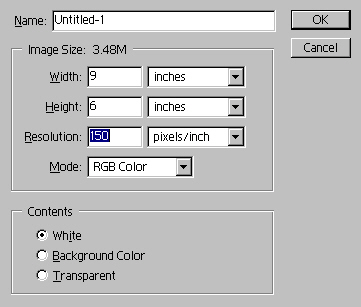


2. Create a new layer.

3. Select a light brown/tan for the foreground color, and a darker brown for the background.


4. Select the Reflected Gradient and fill the new layer from the center to the bottom.

5. Let's add a bit of noise:
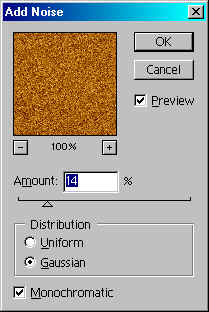


6. Now for a motion blur:
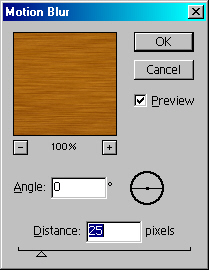


7. If you like, you may want to bring up the Brightness/Contrast and do some adjusting. Tweaking the contrast will give your wood a richer, deeper color.

8. Select the magic wand tool and set the tolerance to 15. Click an area in the wood grain to bring up a jagged selection. Go to Filter>Distort>Pinch to give the selection some 'warp'.
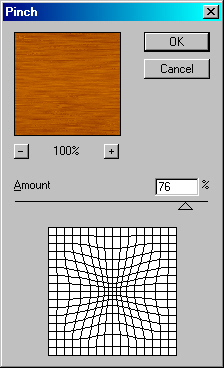


9. Now go to Filter>Distort>Twirl:
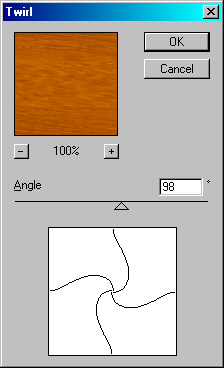


10. Now enter your text with the Type Mask Tool. You will want to make your type fairly large and thick. Mine is set to 150 points.

11. Go to Layer>New>Layer Via Copy.

12. Apply a bevel with the following settings:
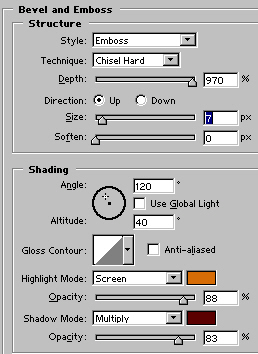


13. Command/CTRL+ Click Layer 2 to bring up your type selection. Contract the selection by 10 pixels.

14. Again, go to Layer>New>Layer Via Copy.

15. Remove the bevel from this layer, and instead apply an inner shadow.
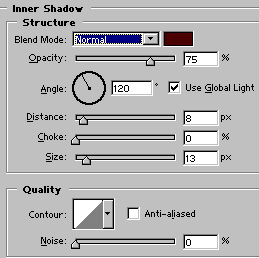


16. Time to get crazy! Duplicate this layer. Create a new layer below it, select the duplicate again and Coomand/CTRL+E to merge them together. Set the merged layer to overlay, and drop the opacity to 50%.

17. Select Layer 3 again. Select the burn tool with a feathered brush. Not too large… I'm using a 27. Color the inlayed text, though do not thouroghly cover it with the tool. Just give the illusion that heat had been applied to the wood at one time or another.
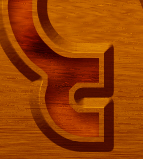


18. You can now go back to the original woodgrain layer and apply some burn there. Keep in mind that the more you drag the burn tool across an area, the darker the burn will appear! Try using some different brushes also… the natural set works well for this work.

Here's where Eye Candy 4000 will come in handy. Remember that top layer we set to overlay? If you have Eye Candy 4000, apply some smoke to this layer.

Just for fun, make your original type layer active. Select Inverse, and then click on the original wood grain layer. Go to Brightness/Contrast and make the image darker, then go to Hue/Saturation and reduce the saturation.



For those of you on your way to Photoshop World, have a great time. For the rest of you, come visit me at Action Fx (http://actionfx.com), and download some of the new goodies.

Web Hosting  |  Membership website templates  |  Dallas Web Design  |  Art Web Templates  |  Cheap Flight Deals  |  Domain Name Hosting  |  Digital Camera  |  Coursework Writing  |  Reseller Hosting  |   Youth hostels  |  Web Design  |  Low Cost Domain Names  |  Burial Life Insurance  |  Website templates  |  Broadband Reseller  |  Dedicated Server  |  Business Broadband  |  Professionelt webdesign firma - webbureau  |  ATX Web Design - Texas TX  |  Flash Templates  |   tablet notebook  |  Flash Intros  |  Web Templates  |  Cheap Web Hosting  |  web hosting  |  Website Templates  |  Corporate Logo Design Service  |  UK Web Hosting  |  Website Hosting  |  Machinery moving Los Angeles  |   Free Web Hosting  |  UK Web Hosting  |  Dating Software - aeDating 4.1  |  Flash Templates  |  Website Templates  |  Power Saver  |  Website Design Quote  |  Flash templates  |  cctv cameras  |  website builder  |  Web Templates  |   Flash templates  |  Cheap Web Hosting Deal  |  Linux Hosting  |  Web Design uk  |  Web Hosting  |  Business web directory  |  Accept Credit Cards  |  Mobile Phone Contracts  |  Car Rental Deals  |  Free domain names  |  Business Email  |  Web Designer Delhi  |  

 
advertisment
advertisment
advertisment
advertisment
  Top-end templates
  Credit Cards
  Reseller web hosting UK
  free flash tutorials
  Web Hosting
  Hosting Directory
  Corporate Gifts
  Company Logos
  Christian Designs
  Website Templates
  Website Templates
  Web Hosting UK
  Free Web Templates
  Custom site design
  Domain Names
  Logo Design Pro UK
  Free Flash
  templatebox.com
  freewebtemplates.com
  templatesland.com
  topfreegraphics.com
  freegraphicland.com
  free-templates-layouts
  Ink & Toner Cartridges
  Layouts4Free
  Webmaster Resoucres
  Web Templates Factory
  Free Web Templates
  Free Templates Catalog
  Web Templates
  Reseller Web Hosting
  Stock Photography
  Animations-galore.com
  4print.com.au
  Host Review
  Web Hosting Host Color
  Dedicated Servers
  FlashTemplateDesign
  ZeroDollarTemplates
  Killersites.com
  how-to-build-websites
  Build a free website
  web Hosting
  Business Logo Design
  Templates Favpage
  webmastermind.de
  flasheasy.com
  More Featured Sites