Tutorials & Script Homepage
Photoshop 36to42
Stamped in Deep Lettering
Photoshop Graffiti
Segmented Pipes
Collaging - Merging 2 images with a Layer Mask
Easy Groves
Glow Effect
3D Sphere or Ball
advertisment
advertisement
advertisement
Host With Us: HostingHelper.co.uk From Only $5.00p/m
Spotted an Error ? Let us Know
100's more FREE templates at FreeWebTemplates
Looking for a new Web Host ?
Free templates from TemplatesLand
Professional High-End Templates
TemplateBox.com more FREE templates
Free Flash Templates and Intros
advertisment
advertisement
 
PHOTOSHOP TUTORIAL NUMBER : 41
Please Click Here, and Help Keep This Site FREE to Use
 
Please click on our sponsors advert to the right if you download or use anything from this page.
Thank you for your help.
This tutorial has been created by: Savvy.net

Glow Effect

1, In order to add a little flair to the glow, you should prepare the background if possible.  To do this, I used filter|render|lighting effects with a single omni light in the middle. This will darken the edges.



2, Render your text or your graphic in a new layer above the background. Choose a nice contrasting color for your graphic to enhance the glow. I used the same color as the background. this will change later.



3, Now add a new layer between the background and the graphic layer. Ctrl-click the graphic layer to load the text or design as a selection. Now go to select|feather, I used a radius of 10, but this depends on the size of the graphic. Normally it will be much more. Dont worry if the edges aren't visible. Now select a color for your foreground. I used red. Press alt+backspace to fill the feathered area. Do this a number of times. I did it 4 times.
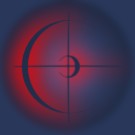


4, Now add a new layer above this one and repeat the steps. This time feather the selections less, only fill it a few times, and use a contrasting color. I feathered the selection 5, use a yellow color and filled it twice.
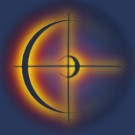
glow4.jpg (4907 bytes)

5, One last time, add a new layer, select your graphic. This time I feathered the selection only 2, and filled it once with white. Now we could leave it like this and it looks okay. There are a couple of things you can do to make the effect stronger though.
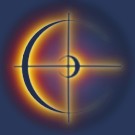


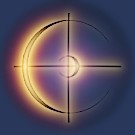
6, If you just de-activate the graphic layer it gives an interesting 'hot' looking effect as such.

glow6.jpg (4220 bytes)

7, To achieve this look, change the blending mode of all the layers to screen, change the blending mode of the layer with the text or graphic on it to color burn. Then use filter|blur|gaussian blur with a small radius to smooth it out a bit.


Web Hosting  |  Membership website templates  |  Dallas Web Design  |  Art Web Templates  |  Cheap Flight Deals  |  Domain Name Hosting  |  Digital Camera  |  Coursework Writing  |  Reseller Hosting  |   Youth hostels  |  Web Design  |  Low Cost Domain Names  |  Burial Life Insurance  |  Website templates  |  Broadband Reseller  |  Dedicated Server  |  Business Broadband  |  Professionelt webdesign firma - webbureau  |  ATX Web Design - Texas TX  |  Flash Templates  |   tablet notebook  |  Flash Intros  |  Web Templates  |  Cheap Web Hosting  |  web hosting  |  Website Templates  |  Corporate Logo Design Service  |  UK Web Hosting  |  Website Hosting  |  Machinery moving Los Angeles  |   Free Web Hosting  |  UK Web Hosting  |  Dating Software - aeDating 4.1  |  Flash Templates  |  Website Templates  |  Power Saver  |  Website Design Quote  |  Flash templates  |  cctv cameras  |  website builder  |  Web Templates  |   Flash templates  |  Cheap Web Hosting Deal  |  Linux Hosting  |  Web Design uk  |  Web Hosting  |  Business web directory  |  Accept Credit Cards  |  Mobile Phone Contracts  |  Car Rental Deals  |  Free domain names  |  Business Email  |  Web Designer Delhi  |  

 
advertisment
advertisment
advertisment
advertisment
  Top-end templates
  Credit Cards
  Reseller web hosting UK
  free flash tutorials
  Web Hosting
  Hosting Directory
  Corporate Gifts
  Company Logos
  Christian Designs
  Website Templates
  Website Templates
  Web Hosting UK
  Free Web Templates
  Custom site design
  Domain Names
  Logo Design Pro UK
  Free Flash
  templatebox.com
  freewebtemplates.com
  templatesland.com
  topfreegraphics.com
  freegraphicland.com
  free-templates-layouts
  Ink & Toner Cartridges
  Layouts4Free
  Webmaster Resoucres
  Web Templates Factory
  Free Web Templates
  Free Templates Catalog
  Web Templates
  Reseller Web Hosting
  Stock Photography
  Animations-galore.com
  4print.com.au
  Host Review
  Web Hosting Host Color
  Dedicated Servers
  FlashTemplateDesign
  ZeroDollarTemplates
  Killersites.com
  how-to-build-websites
  Build a free website
  web Hosting
  Business Logo Design
  Templates Favpage
  webmastermind.de
  flasheasy.com
  More Featured Sites