|
Segmented Pipes
Here is my Version of the ever popular Segmented Pipes. A
staple for interfaces.

1, Create a new layer and make a retangular selection.

2, Select the linear gradient tool and the copper gradient.
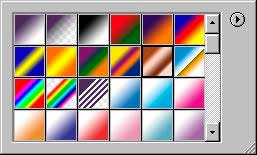
3, Drag from the top to the bottom of the selection, you now have a copper pipe.

4, For this excercise we want a chrome pipe, so suck all the color out by going Shift+Ctrl/Cmd+U
to desaturate the image. Or select desaturate from the menu.

5, Now to make it more shiny chrome, open our famous curves box and use a similar curve.

6, And we now have a shiny Chrome pipe..

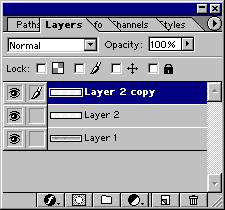
7, To add the segments: Create a new layer and draw a 2 pixel line in black.

8, Duplicate the layer and press Ctrl/Cmd+I to invert the color, press the right
keyboard arrow key 2x to nudge the white line over. Change it to overlay mode in
the layer mode menu.
Link the 2 lines and merge linked.
Alt/Option+Shift and drag the lines to duplicate them along the pipe.
9, Here is a finished one with some color added by using hue/saturation with the
colorize box checked.
|




 advertisment

 advertisement

 Host With Us: HostingHelper.co.uk From Only $5.00p/m