Forms (Part 1)
Forms are the most popular way to make web pages interactive. Like forms on
paper, a form on a web page allows the user to enter requested information and
submit it for processing. (Fortunately, forms on a web page are processed much
faster.)
Let's look at a very simple form:
| this code |
produces this |
<FORM ACTION="/cgi-bin/mycgi.pl">
	favorite color: <INPUT NAME="color">
	</FORM>
|
|
This form has all the required elements for a form:
<FORM ACTION="/cgi-bin/mycgi.pl">
- Start the form here. The
ACTION attribute, which is required with every <FORM ...>
tag, is used to set what happens when the form is used e.g send the results to given page.
<INPUT NAME="color">
- Data entry field.
<INPUT ...> creates most types of form fields, but <TEXTAREA ...>
and <SELECT ...> also create certain types.
</FORM>
- End the form here.
Of course, this form doesn't do much. You can type something into the one field, but that's it, nothing
happens from there.
Forms and CGI
The original and still most popular use for forms is in conjunction with CGI
(Common Gateway Interface). In the CGI way of doing things, the data the user enters is sent to
the web server, where a program processes the data and returns the results. In other words, all the data is processed
on the server, not in the web browser.
Let's expand our earlier example to show how to incorporate CGI:
<FORM ACTION="/cgi-bin/mycgi.pl">
favorite color: <INPUT name="favecolor">
<INPUT TYPE=SUBMIT VALUE="Submit">
</FORM>
which gives us
Here's what the new pieces mean:
<FORM ACTION="/cgi-bin/mycgi.pl">
ACTION tells the browser where to send the data for processing
(more on that shortly). ACTION is required with every form, even forms that don't use
CGI.
<INPUT name="favecolor">
- We've added the
NAME attribute. NAME identifies each field, "names" it so it can be
referred to later.
<INPUT TYPE=SUBMIT VALUE="Submit">
- This
<INPUT ...> tag creates the "submit" button, which the user presses to send the form
to the web server.
That's the basic set up for a CGI form, but what happens after the user presses Submit? Consider, for
example, this simple form:
Here's the chain of events when the user hits "Submit":
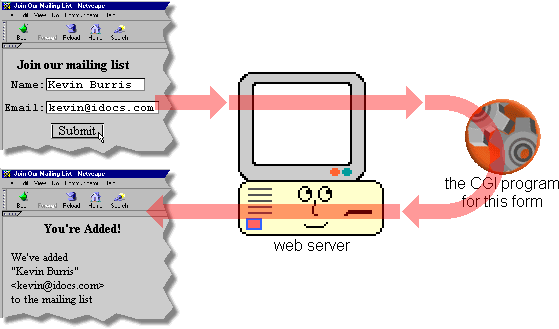
- When the user presses Submit, the browser sends the form data to the web server.
- The web server launches the CGI program which was written to process this form.
- The CGI program does whatever it does with the data. The program might consult a database, perform
calculations on the data, use the data to add the user to a mailing list, whatever the programmer wants it to do.
Whatever else the program does, it generates a web page using HTML so the user can see the results of submitting the form.
- The CGI program passes the HTML back to the web server.
- The web server passes the HTML back to the browser.
So there are three pieces to the CGI process: the form on your web page, the web server, and the CGI program.
This guide deals with the first part: how to use HTML to make a form. Your web administrator handles the web
server, and for a good guide on how to write CGIs, we recommend James Marshall's excellent (and short)
CGI Made Really Easy.
Technically speaking there is no such thing as "a CGI". "CGI" is a standard protocol, not an actual implementation.
However, it has become common to refer to a program which uses the CGI standard as "a CGI", and we will follow that
custom here.
One of the reasons CGI is so popular is that the CGI program can be written in just about any programming language:
C, C++, Perl (the most popular language for CGI), Visual Basic, etc. CGI was designed to allow great flexibility in
processing the form data, while still allowing the results to be returned as HTML (or other formats, but HTML is the
most popular).
I hope this came in useful!
Ask in the forum
if you have any suggestions or comments.
|




 advertisment

 advertisement

 Host With Us: HostingHelper.co.uk From Only $5.00p/m








